Smart Thermostats
Ontario Smart Thermostat Rebate: Buy Now or Get the Code First in 2026
Smart thermostat rebate Ontario before you buy vs after you buy: choose the $100 code or receipt path and avoid claim delays.
If you are comparing the smart thermostat rebate Ontario before you buy vs after you buy, the practical question is simple: do you want the $100 discount at checkout, or do you need to claim it after you already paid?
Both routes can work, but they are not equally forgiving. The before-you-buy code is usually cleaner; the after-you-buy claim is useful when you bought from another retailer, as long as the model, receipt, and timing line up.
| What you see | Likely cause | First move |
|---|---|---|
| You have not bought yet | You can still use the instant-code path | Check eligibility, then request the code before checkout |
| You already bought one | You may need the receipt-upload route | Confirm the model is eligible and count 60 days from purchase |
| The model is on sale | Retailer price and program eligibility are separate | Verify the exact model number, not just the brand |
| You had a past free device or rebate | Prior participation can block a new claim | Check your household history before applying |
What you need before choosing a rebate path
Estimated time: 10 to 15 minutes. Gather your utility account details, home type, heating or cooling setup, the exact thermostat model number, and a place to save emails and receipts. Small details matter here because the rebate is tied to eligibility, not just to buying a smart thermostat.
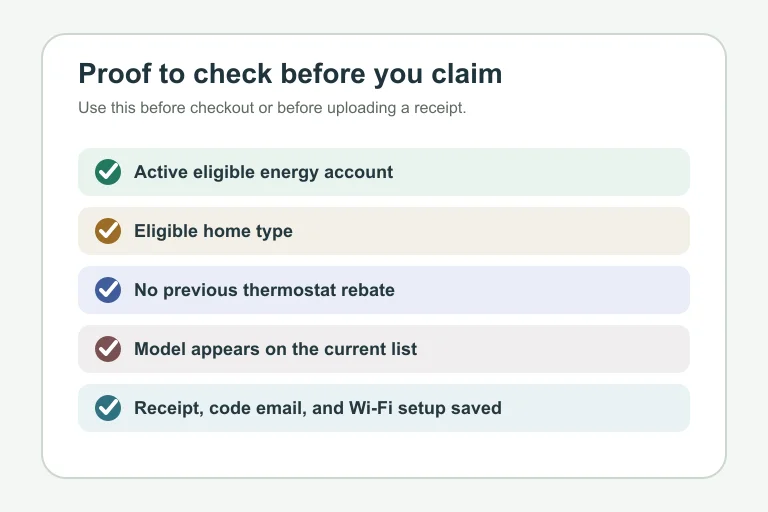
- An active Enbridge Gas account with qualifying gas heating, or an Ontario electricity-grid connection with electric heating or cooling.
- A single, semi-detached, row, townhome, or mobile home on a permanent foundation.
- No previous smart thermostat rebate, discount, or free device from the listed Ontario programs.
- The exact model number from the eligible-model list.
- A saved receipt if you use the after-purchase route.
smart thermostat rebate Ontario before you buy vs after you buy: which path fits?
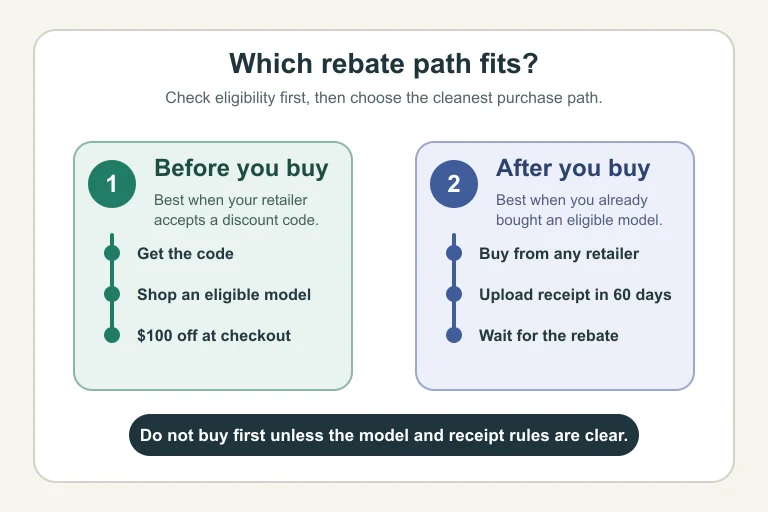
Estimated time: 5 minutes. Pick the path based on when you are making the decision, not on which wording sounds better. Before-you-buy means you apply for a code first, receive it by email, and use it at a participating checkout. After-you-buy means you purchase an eligible model and then upload your receipt within the program window.
- Choose before you buy if you have not purchased yet and can buy through a retailer that accepts the code.
- Choose after you buy if you already bought an eligible thermostat or need a retailer outside the code path.
- Pause before installing if the model number, account eligibility, or receipt date is unclear.
Here is the plain-English tradeoff: the code route reduces cash out of pocket right away, while the receipt route gives you more retailer flexibility but more paperwork risk.
Step 1: Confirm your household is eligible
Estimated time: 10 minutes. Start with the household rules before you shop. Confirm the account type, the home type, and whether anyone at the address has already received a smart thermostat rebate, discount, or device through Enbridge Gas, Save on Energy, or Home Renovation Savings.
- Find the name on the gas or electricity account.
- Confirm the home is an eligible low-rise residential property.
- Check whether your heating or cooling setup matches the program language.
- Look through old emails if you are unsure about past participation.
Honestly, this is where people often rush. A $100 rebate is not worth buying the wrong device or creating a claim that stalls because the home was not eligible.
Step 2: Use the discount code if you have not bought yet
Estimated time: 15 to 25 minutes, plus shopping time. If you are still planning the purchase, request the instant rebate code before checkout. Once the code arrives, shop through a listed code partner and apply the discount while paying.
- Open the official rebate page and request the code.
- Save the code email in case the cashier or checkout page asks for it again.
- Shop only for an eligible model, using the exact model number as your check.
- Confirm the $100 reduction appears before you complete payment.
- Keep the receipt anyway, even when the discount works at checkout.
Step 3: Use the receipt claim if you already bought
Estimated time: 20 to 30 minutes. Already bought the thermostat? Your next job is to move quickly. The official route says to upload the receipt within 60 days of purchase, so the purchase date on the receipt matters.
- Check the receipt date and calculate the 60-day deadline.
- Confirm the receipt shows the retailer, date, product, and amount paid.
- Match the thermostat model against the current eligible-model list.
- Submit the rebate form and upload the receipt file.
- Save the confirmation screen or email.
Use a clear PDF or photo. Blurry uploads, missing model details, and cropped receipts are easy ways to turn a simple claim into a follow-up request.
Step 4: Install it, connect Wi-Fi, and keep the proof
Estimated time: 30 to 90 minutes. Installation is usually straightforward, but compatibility still matters. Before removing the old thermostat, check whether your system needs a C-wire, whether the manufacturer app supports your setup, and whether you are comfortable working around low-voltage wiring.
- Take a photo of the old thermostat wiring before disconnecting anything.
- Follow the manufacturer's app or installation guide.
- Connect the thermostat to Wi-Fi after installation.
- Keep the code email, purchase receipt, model number, and submission confirmation in one folder.
If wiring looks odd, stop and call a qualified HVAC contractor. A rebate should not turn into a damaged control board.
Before-you-buy vs after-you-buy: the safer choice
Estimated time: 5 minutes. If you have not purchased yet, the safer route is usually before you buy. You confirm eligibility, request the code, and see the discount before money leaves your account.
After you buy is still useful. It makes sense when you found an eligible model at another retailer or bought before learning about the rebate, but it puts more weight on your receipt, model number, and deadline tracking.
Related Ontario rebate reading
Smart thermostat planning often overlaps with larger home upgrades. For the broader incentive picture, compare the Canada Greener Homes Loan and Ontario rebates, check whether Ontario home renovation rebates are worth it, and review the Home Renovation Savings application portal before you start a bigger project.
If your next upgrade needs preapproval, read the Ontario solar battery rebate preapproval guide, the heat pump income eligibility guide, and the heat pump water heater assessment path.
For envelope upgrades, compare Ontario window rebates per opening, window and door assessment rules, window rebate invoice checks, insulation quote questions, exterior wall insulation rebates, basement air sealing rebates, attic insulation R-value tiers, and basement insulation assessment rules.
For paperwork and risk control, keep the before-and-after photo requirements, payment proof checklist, contractor quote checklist, energy advisor cost guide, rebate cheque status guide, and Ontario energy rebate scam warning handy.
Quick Checklist
- Confirm your gas or electricity account fits the program rules.
- Check whether your address has already used a thermostat rebate.
- Match the exact thermostat model number before paying.
- Use the instant code path if you have not bought yet.
- Upload the receipt within 60 days if you already bought.
- Save the receipt, code email, and submission confirmation.
- Connect the thermostat to Wi-Fi after installation.
The best path is the one that leaves the least room for a rejected claim. If you are still shopping, get the code first. If the thermostat is already on your kitchen table, move fast, check the model number, and upload a clean receipt before the deadline.
Frequently Asked Questions
Can I get the Ontario smart thermostat rebate after I buy?
Yes, if the thermostat is eligible and you upload the receipt within the stated 60-day window. Check the model number and receipt date before starting the claim.
Is it better to get the smart thermostat rebate before you buy?
Usually, yes. The before-you-buy code lowers the price at checkout and reduces paperwork, provided you can shop through a retailer that accepts the code.
What happens if my smart thermostat model is not on the eligible list?
Do not count on the rebate. Program eligibility is tied to specific models, so a similar-looking thermostat from the same brand may still fail the claim.
How long do I have to upload my smart thermostat receipt in Ontario?
The official after-purchase route says to upload the receipt within 60 days of purchase. Use the receipt date, not the installation date, as your deadline.
Can I use the rebate if I already received a thermostat discount before?
Probably not. The eligibility rules exclude households that already received a smart thermostat rebate, discount, or device from the listed Ontario programs.
Official sources: Get smart thermostat rebate · Smart Thermostats | Ontario. Check current program pages before applying.