Rebates
How to Use the Home Renovation Savings Application Portal in 2026
Use the Home Renovation Savings rebate application portal 2026 with the right assessment path, documents, contractor checks, and timing.

If you searched for the Home Renovation Savings rebate application portal 2026, you are probably trying to figure out where to start without accidentally choosing the wrong rebate path. The portal is only one part of the job. Your bigger task is matching your home, upgrade type, timing, and documents to the program stream before anything gets uploaded.
Here is the practical way to approach it: decide whether your upgrade needs a home energy assessment, collect the proof the program will expect, then submit only when the names, addresses, dates, and product details line up. That sounds basic, but it is where a lot of rebate files get messy.
| What you see | Likely cause | First move |
|---|---|---|
| You are asked about a home energy assessment | Your upgrade may be in the assessment-required stream | Stop and confirm the stream before hiring or starting work |
| The portal asks for utility or heating details | Eligibility depends on account, grid, or heating fuel information | Match the account name and service address to your home records |
| Your invoice lacks model or rating details | The product proof may not be specific enough | Ask the contractor or retailer for a corrected invoice before uploading |
| You already started the work | Some rebate paths require steps before installation | Check the official path before submitting, especially for bundled upgrades |
What you need before opening the portal
Budget about 30 to 45 minutes for this prep if your paperwork is already in one folder. Give yourself longer if you are comparing multiple upgrades, because the assessment-required and no-assessment streams work differently.
- Home address, owner details, and utility account information.
- Your current heating fuel and, where relevant, confirmation that the home is connected to the Ontario electricity grid.
- Upgrade quotes, invoices, product model numbers, rating documents, and contractor details.
- Initial home energy assessment records if the upgrade stream requires one.
- Photos, receipts, and confirmation numbers saved in a single project folder.
Step 1: Choose the right rebate stream
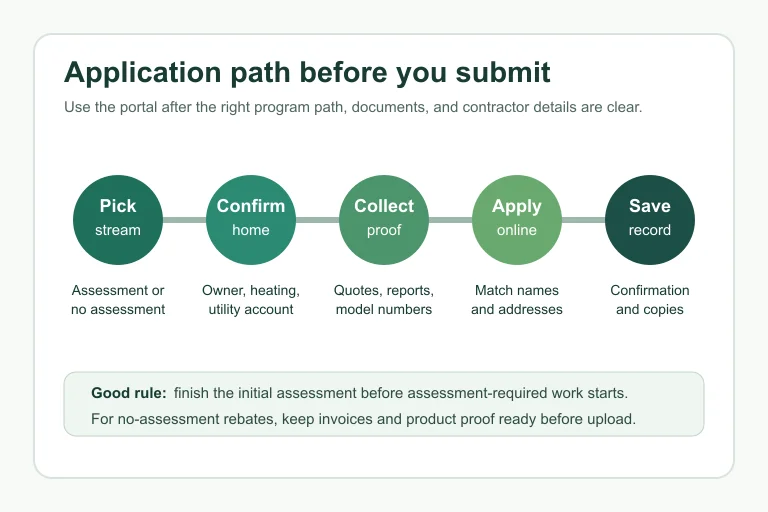
Estimated time: 15 minutes. Start at the official program page and separate your project into one of two buckets: upgrades that require a home energy assessment and upgrades that do not. Insulation, windows and doors, air sealing, and heat pump water heaters can sit in the assessment-required path, while some targeted upgrades have their own direct application flow.
- Write down every upgrade you plan to claim.
- Check whether each one is listed under assessment-required or no-assessment rebates.
- If you are bundling upgrades, confirm whether the program expects two or more qualifying upgrades in that stream.
- Do not rely on a contractor quote alone. Cross-check the official program page before you commit.
Assessment-required projects need more patience. The official Home Renovation Savings page says you start with an initial home energy assessment, complete the required qualifying upgrades, then book a follow-up assessment before rebates are processed.
Step 2: Check homeowner and property eligibility
Estimated time: 10 to 20 minutes. Eligibility is not just about buying efficient equipment. The program can ask who owns the home, what type of home it is, how it is heated, and whether the account or service address matches the application.
- Confirm that the applicant is the homeowner or the owner applying for a tenant-occupied property where the rules allow it.
- Check the home type before assuming a condo, mobile home, row house, or rental situation qualifies the same way as a detached house.
- Compare the name and address on the utility account with the name and address you plan to enter.
- Keep a short note explaining any mismatch, such as a legal name difference or recent move, in case support asks.
Step 3: Line up contractors, products, and timing
Estimated time: 30 minutes before booking. The portal cannot rescue a project that was done in the wrong order. For assessment-required upgrades, book the initial assessment before work starts. For direct rebates, check the product and contractor requirements before purchase or installation.
- Ask the contractor which rebate path they believe applies, then verify it yourself.
- For heat pump work, review the Ontario heat pump rebate pre-approval checklist before signing.
- If you are switching fuels, compare the propane-to-heat-pump rebate checks and oil-to-heat-pump rebate checks.
- Use the participating contractor list when a program path requires a recognized installer or service organization.
- For insulation, check whether your project fits attic, basement, exterior wall, or crawl space rules before the quote is finalized.
Honestly, this is where people usually get it wrong. They treat the portal like a formality, then discover that the invoice, timing, or product proof does not match the rebate stream they chose.
Step 4: Prepare documents for upload
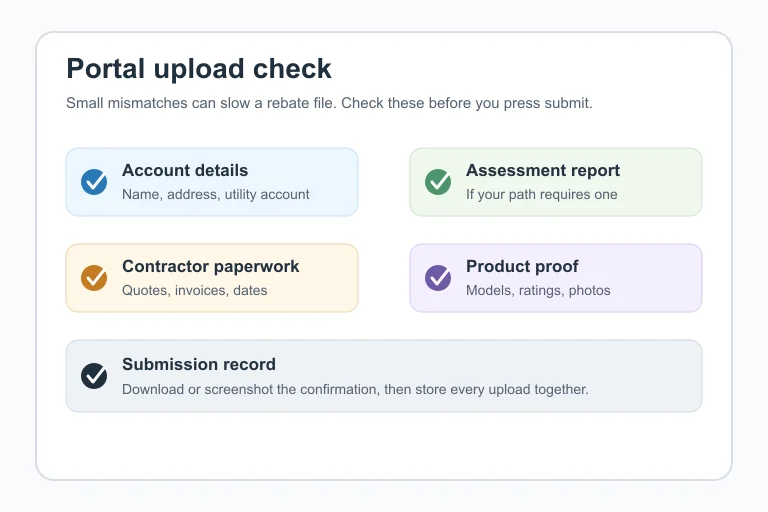
Estimated time: 20 to 40 minutes. Before you open the portal, rename files so they are obvious. A file called invoice-final.pdf is not as useful as 123-Main-St-attic-insulation-invoice-2026.pdf.
- Save the invoice with the contractor name, installation address, date, and payment details visible.
- Keep product documents that show model numbers, efficiency ratings, or eligibility details.
- For audit-based projects, include the assessment report and follow-up assessment details when required.
- For air sealing, review how the Ontario air sealing rebate blower door test fits before relying on it as one of your main upgrades.
- For appliance claims, keep the receipt and product proof together with the Ontario appliance rebate basics.
Use the same spelling of your name and address everywhere. If your utility bill says “Unit 2,” do not switch to “Apartment B” in the portal unless the form forces that format.
Step 5: Submit the application and save proof
Estimated time: 20 minutes. Once the portal is ready, move slowly. Upload one file at a time, check the preview or file name, and read the final declaration before submitting.
- Enter the applicant, property, and utility details exactly as they appear on your supporting documents.
- Select the rebate stream that matches your upgrade, not the one with the largest amount.
- Upload invoices, reports, product documents, and photos in the fields that best match each request.
- Before submitting, compare your expected timing against the Home Renovation Savings deadline guide.
- Download or screenshot the confirmation page and save every email from the program.
For the assessment-required path, the official page says rebate payment follows the final home energy assessment and submission of required documents by the registered energy advisor. That means your online step is not always the last step in the file.
Common portal mistakes that delay files
Estimated time to prevent: 15 minutes. Most avoidable delays come from mismatched details, missing proof, or choosing a path before the rules are clear. A quick review before submission is less painful than reopening the file later.
- Starting assessment-required work before the initial assessment.
- Uploading a quote when the portal asks for a paid invoice.
- Submitting a product name without a model number or rating proof.
- Using a contractor whose role does not match the program requirement.
- Missing deadline risk, especially around project completion or purchase dates.
- Responding to a rebate call, text, or door-to-door claim without checking the Home Renovation Savings scam warning.
Related planning guides by upgrade
Use these guides if your application depends on a specific upgrade type. For insulation work, compare the attic insulation rebate deadline, attic insulation participating contractor checks, basement wall insulation rebate planning, exterior wall insulation rebate planning, and crawl space insulation rebate path.
For heating and larger energy projects, review the electrically heated home heat pump rebate rule, gas-heated home heat pump rebate rule, heat pump water heater eligibility, ground source heat pump rebate planning, and cold climate heat pump sizing guide. For generation projects, keep the solar panel rebate questions close by.
If the audit path is still unclear, the home energy assessment cost rebate guide can help you decide whether the extra steps make sense for your renovation.
Quick Checklist
- Confirm whether your upgrade requires an initial home energy assessment.
- Check homeowner, heating fuel, utility, and home type eligibility.
- Save invoices, product proof, assessment reports, and photos before uploading.
- Verify contractor or service organization requirements before work starts.
- Use consistent names, addresses, and account details throughout the application.
- Save the portal confirmation and every follow-up email.
- Check official program pages again before making a final purchase or booking decision.
Final word before you apply
A rebate portal rewards clean paperwork and the right order of operations. Start with the stream, prove the home and upgrade qualify, then use the application as the final record of a project you already understand.
Official sources: Home Renovation Savings assessment-required upgrades · Save on Energy Home Renovation Savings overview. Check current program pages before applying.
Frequently Asked Questions
Where is the Home Renovation Savings rebate application portal?
Start from the official Home Renovation Savings pages and choose the rebate path for your upgrade. Some pages send you to a direct application, while assessment-required upgrades begin with service organization and energy assessment steps.
Do I need a home energy assessment before applying?
Only some rebate streams require one. If your project is in the assessment-required group, book the initial assessment before starting work and expect a follow-up assessment after upgrades are complete.
Can I apply after the renovation is already done?
It depends on the rebate stream. Direct rebates may allow post-purchase applications within program rules, but assessment-required projects can be disqualified if work starts before the initial assessment.
What documents do I upload for Home Renovation Savings rebates?
Expect to need applicant and property details, invoices, product proof, contractor information, photos, and assessment documents when required. The exact upload list depends on the upgrade.
How long does the rebate take after I apply?
Timing depends on the program path and whether the file is complete. For assessment-required upgrades, the official page says the cheque should arrive by mail within 60 days after the follow-up assessment is completed and the registered energy advisor submits required documents.